
Tips for Buying Kids Apps
It’s amazing what technology can do these days. My kids (if I let them) could spend hours on their electronic devices playing games, reading or watching videos. When my 8 year old got a tablet for Christmas, I was noticing that she kept coming in asking for a new app. Like constantly. I asked her to play what she had before getting something new, and she would agree for a time.
I received download of Spot was compensated in exchange for this post. All opinions are my own.
 It made me really think about which apps she was downloading and what were the best kids apps out there. We all usually grab up free apps, but if it’s worth it, we want to make sure we are getting our moneys worth out of the paid apps.
Here are a few tips for buying kids apps..
Sources
Did you know that just about anyone can create an app and put it up on the App store or Google Play store? Yup, doesn’t take much at all. That’s why you want to make sure you are getting something from a trusted education company that you recognize, or that you can find information on quickly. Check out the user ratings on the app, or ask other parents that you know about their experiences using the app.
Educational and Fun
Find an app that has the right blend of fun and learning. Most apps will have screen shots or videos for each app, check them out and see what you think. If the game is free, download it and play it yourself. If it doesn’t meet your standards, just delete it.
Age Appropriate
This one is pretty important. Nothing is more frustrating for a child than something they don’t understand or don’t have the dexterity to play yet. If you child doesn’t read, make sure the app also has audio directions with the app, instead of just onscreen directions.
For my 2nd grader, I found an app that really stretches her imagination and gets her creativity sparked! David Wiesner, 3 time winner of the Caldecott Medal for distinguished American picture books for children, has created Spot, a wordless book app that takes you through 5 fantastical worlds!

If you are familiar with the amazing David Wiesner books like Tuesday or Mr. Wuffles! then you know the beautiful worlds that David creates using beautifully drawn characters and places. David brings the fantastically to life by making walking cats and flying pigs! Now these amazing worlds are in one cool app. Available now exclusively for ipad, Spot uses a pinch and zoom format (zoom in and out using your fingers) to explore worlds within worlds.
Check it out!
All of my girls were extremely fascinated by Spot. From my 13 year old daughter to my 2 year old, they were all gathered around me watching as we zoomed from one scene to another. It was so cool to find ourselves right back in the place we started, and we would challenge ourselves to get back there again. I had fun asking them to tell me a story based on what they were seeing. David Wiesner’s Spot would make a great writing prompt for writing assignments or homeschooling. We also found Spot to be quite calming, a real fun add to our bed time routine.
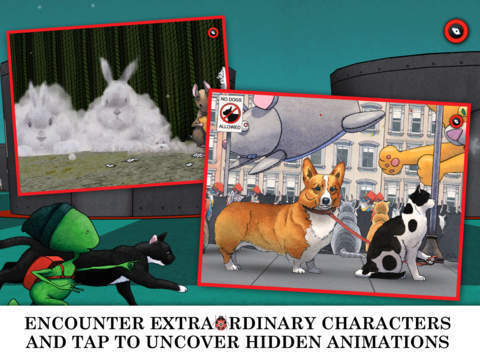
David Wiesner’s Spot is available to download on the iTunes app store. You can also check out all of David Wiesner’s work from his website here.






My daughter loves my reading and math app. My son loves my games by Disney app.
minecraft of course
We have gone through so many apps its crazy. Thank you for sharing.
we use FarFaria only, so far… but my tot is only 3. I am always on the lookout for education apps to DL in the future!
Those look like great apps. This would be a great resource in my homeschooling.
I am so leery of apps for kids but you gave some great tips. Thanks
My son likes Raz kids.
My daughter likes the Talking Pocoyo! app
Both of my kids like the Monkey Preschool Lunchbox app
I really need to figure out which apps I should get for my son. Your tips are spot on!
I NEVER IN MY LIFE KNEW THERE WAS SO MANY EDUCATIONAL AND FUN APS FOR KIDS THESE ARE AWESOME THANKS FOR SHARING WITH ME
The only games I allow my children to play on my tablet is educational apps. They have their video games but I prefer them playing something that teaches them something.
Oh man, seems like my son’s favorite app changes daily! Definitely need to try some new educational apps!
Great tips! My 6 and 4 year olds have tablets and this will definitely come in handy.
I love when my kids play with educational apps! On the other hand, my son is in love with Angry Birds.
Great tips! I usually get the free apps for my kids. I’ve been thinking of getting some learning apps for them. Thanks for sharing these tips. They’ll come in handy when picking out apps.
Ugh, I struggle so much with electronics. I mean, so many apps teach them, that I hate limiting, but at the same time, they need other time, too 🙂 This sounds really helpful.
Although I try to limit the amount of electronic’s time my son has, he has learned so much through educational apps on his iPad. It even helped him to learn his ABC’s.
I love how many educational apps there are for kids these days. I would have loved to use them with my kids, especially while we were on the road.
We took a break from the iPad and apps for a while. We are ready to start using it again for educational apps. I love all of the fun apps to help my son to learn to read and math.
My kids love apps and I always keep an eye on what they are buying. Reading apps and games are a favourite at my house.
What great tip, my kids are ALWAYS coming up to me and asking if i purchase this APp and that Ap. I usually say no unless its cheap and educational. 🙂
My daughter loves the reading apps. And of course youtube toy reviews haha.
My son is obsessed with Angry Birds!
I always make sure my kids have age appropriate apps. I usually go the free to play route, but if there’s a particular app that they’re really clamoring for, I’ll get it when it goes on sale.
These are great tips! My daughters are always looking for new fun apps and games!
Great app, I’ll have to check this out out. Looks like one my twins would just love!
They love the math ones for learning
We have yet to find an app my little one likes.